


Call Recorder Automatic
2.47.08K Reviews
App Specs
- Version
- 1.1.322
- Updated On
- License
- Free
- Downloads
- 50,000,000+
- Developer
- Tap AI
- Categories
- Communication
- Platform
- Android
Screenshots

 Analysis by AppCompare
I find call recording most useful when a conversation contains details I can’t easily write down while listening. A delivery dispute, a complicated appointment, or a work call with several decisions can leave me trying to remember names and next steps afterward. Call Recorder Automatic is aimed at that gap: it turns a phone conversation into something I can revisit, rather than asking me to split my attention between listening and note-taking.
That convenience has a real boundary. Recording changes the feel of a call, and it should never be treated as a private shortcut around another person’s expectations. I’d use this kind of tool only when recording is lawful and the other person knows about it. If what I need is a reminder of my own commitments, a quick note after the call may be simpler and less intrusive.
Getting Started with Call Recorder Automatic
First things first, downloading Call Recorder Automatic is a breeze. Available for both Android and iOS, you can find it on your respective app store. Once installed, the setup is pretty straightforward. The app asks for necessary permissions—like access to your contacts and microphone—which makes sense given its function. Don't worry, it’s all par for the course when it comes to call recording apps.
Features That Stand Out
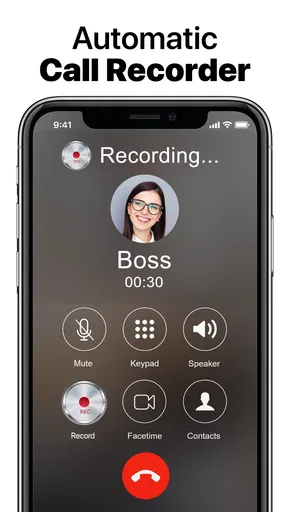
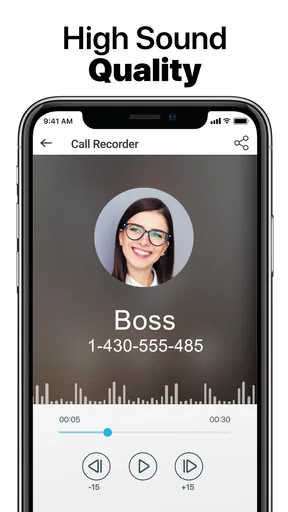
Once you’ve got it up and running, what really took me by surprise was how user-friendly it is. The interface is clean and intuitive. You don’t have to be a tech wizard to figure it out. The app automatically detects incoming and outgoing calls, so you don't have to fumble around trying to start recording manually. Just have your conversation, and the app takes care of the rest.
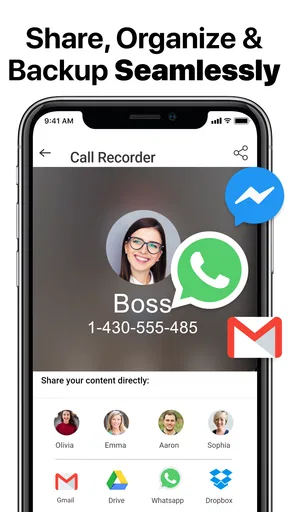
One feature that I found particularly useful is the ability to share and save recordings effortlessly. You can easily upload them to your cloud storage or send them to someone via email. The app also supports various formats, which is a great plus.
That automatic approach suits calls where reaching for the screen would interrupt the conversation. I’d still build a small routine around it: make sure the app is set up before an important call, then check afterward that the recording is present and clear enough to use. Automatic capture can reduce missed starts, but it doesn’t remove the need to confirm the result. For a call where a single figure or instruction matters, I would not rely on memory of whether the app ran.
When a Recording Helps More Than Notes
A realistic example is a call with a repair service that gives a time window, a quoted amount, and a list of things to prepare. Trying to type all three while asking follow-up questions can make me less attentive. If recording is appropriate and everyone is informed, I can listen normally and later replay only the part I need. The practical benefit is not simply having an audio file; it is being able to check a detail instead of calling back because I misheard it.
Worth Reading Before You Choose

EA SPORTS FC Mobile 26 Is a Bigger Football Game, but It Takes Time

Flipboard Shows What News Apps Must Do Beyond the Feed

Switching to Android Auto Means Rethinking Your Driving Routine

Google Calendar Makes a Crowded Week Easier to Manage

Ludo King Makes the Most of the Minutes Between Plans

Baby Panda World Brings Quick Play to Modern Phones, but Its Game Library Feels Busy
For work, the same idea can help when a client explains a change in scope or a colleague gives several verbal instructions. I’d use recordings as a reference, not as a substitute for confirming decisions in writing. A short follow-up message with the agreed action points is easier to share and search than audio, while the recording can help resolve what was actually said if a detail is disputed.
This distinction matters because listening back takes time. I’d make a recording for a conversation with dense or consequential details, not for every ordinary call. If the call only contains one simple reminder, a note or calendar entry is usually quicker to revisit. The app is most useful when the value of getting the wording right outweighs the extra effort of storing and reviewing audio.
Privacy Concerns and Legal Stuff
Okay, let’s talk privacy. It's essential to mention that call recording laws can vary significantly depending on where you live. The app does remind you to comply with local regulations, which is a nice touch. Always make sure you inform the other party that the call is being recorded. Better safe than sorry, right?
I’d also treat saved audio as sensitive, even when the conversation seems routine. A recording may include addresses, account details, health information, or someone speaking candidly. Before sharing one, I’d listen through and check that it contains only what the recipient needs. If the goal is to preserve one decision, sharing a concise written summary may protect more of the conversation and be easier for the other person to use.
Cloud backup can be valuable if a phone is lost or the recording needs to be available elsewhere, but it also means thinking carefully about where copies are kept and who can access them. I would not upload a sensitive call casually just because cloud storage is convenient. For private conversations, the safer workflow may be to keep the file local, avoid unnecessary copies, and remove it when it no longer serves a purpose.
The User Experience
Using Call Recorder Automatic has been smooth sailing for the most part. It starts, stops, and saves recordings without a hitch. However, there were times when the audio quality varied depending on the connection. Nonetheless, it was still clear enough to understand the conversation.
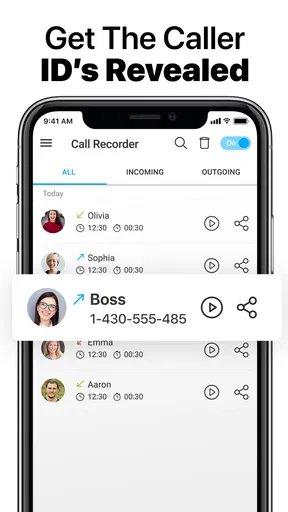
I also appreciated the fact that you can organize your recordings by date or contact, making it super easy to find that one particular call you’re looking for. Plus, the search function works pretty well, which is not something you find in every app.
To make that organization useful over time, I’d settle on a naming or cleanup habit rather than letting every call accumulate. Contact and date are helpful starting points, but they do not explain why a recording matters. Since tagging and notes are not part of the experience described here, I’d keep a separate brief note for important files, such as the subject and follow-up date, without putting sensitive details in an unprotected place. That small step can save a lot of replaying later.
It is also worth checking a recording soon after a call that matters. If the sound is unclear, discovering that weeks later is too late to ask for clarification. A quick review lets me catch a missed detail while the conversation is still fresh and send a written confirmation if needed. This is a practical safeguard, not a promise that every call will produce equally usable audio.
How It Compares With Other Ways to Keep a Record
Compared with taking notes during a call, automatic recording can preserve the speaker’s exact wording and leave me more present in the conversation. Notes are faster to scan, though, and they are usually easier to share without exposing an entire discussion. I see the two as tools for different jobs: audio for checking complex details, and a short written summary for tracking decisions and tasks.
Compared with asking someone to send the information by email or message, a recording is less tidy but can capture context, tone, and the order in which details came up. Written confirmation is better when both people need a clear, agreed reference. For a work commitment, I would ideally use the call to discuss the issue and a follow-up message to confirm the outcome, rather than expecting a recording to do both jobs.
Some phones or communication services may offer their own call-recording options, and those can be preferable if they work reliably for a person’s device and calling habits. A separate app such as this one is worth considering when its automatic handling and recording organization fit the way someone makes ordinary calls. The trade-off is that call recording depends on device and system behavior, so I’d test it with a non-sensitive conversation before trusting it for an important one.
Who Will Get the Most From It?
I can see the appeal for someone who regularly receives detailed calls and needs to revisit exact instructions: freelancers discussing revisions, people coordinating appointments, or anyone managing complicated service arrangements. It may also suit a person who finds live note-taking distracting. The app is less compelling for someone who rarely needs a call transcript-like reference, dislikes keeping audio, or expects a recording to replace written documentation.
It is not the right fit when the other person objects, when recording would undermine trust, or when the conversation contains information that should not be retained. In those cases, I’d ask for permission to take notes, request a written recap, or simply write down the key points immediately afterward. A recording tool should support a conversation, not pressure someone into having it on terms they did not agree to.
What Could Be Better?
No app is perfect, and Call Recorder Automatic is no exception. While it gets the job done, it would be great to see more customization options in the future. For instance, being able to tag recordings with notes or categories could be a game-changer for users who rely heavily on call recording for business purposes.
Another area for improvement would be the integration with other apps. Imagine being able to link your calendar with the app to automatically record business meetings. Now, that would be something!
There is also a broader trade-off in the word “automatic”: fewer steps can make recording easier, but they can make it easier to capture a conversation without pausing to consider whether that call should be saved. I’d make consent and purpose part of my own routine, not assume the app’s convenience settles either question. A simple rule—record only when I have a clear reason and the other person is comfortable—keeps the tool from changing a casual call into an unwanted archive.
The app is free to install, with in-app purchases ranging from about two to twenty dollars per item. I’d decide whether its core workflow suits me before spending on anything. It is rated for Everyone, but that age label does not mean every conversation is appropriate to record or that every user will find the privacy choices straightforward. The developer is Tap AI, and the current version is 1.1.322; it supports Android 5.0 and later.
As a communication app, it has a clear and narrow purpose rather than trying to replace messaging or calling. It has been available since June 5, 2014, and its popularity is reflected in over 50 million installs, though its average rating is 2.5 from around 504,000 ratings, alongside about 7,100 written reviews. I would take that mixed reception as a reason to test the recording behavior on my own phone before depending on it, not as proof that every user will have the same experience.
Final Thoughts
All things considered, Call Recorder Automatic is a handy tool that fulfills its primary purpose effectively. Its simplicity and automatic features make it a go-to for anyone needing to record calls without fuss. Whether you're a journalist, a professional, or someone who simply likes to keep records, this app is worth checking out.
Just remember to stay on the right side of the law and inform your contacts before hitting that call button. Give it a try, and see how it fits into your daily routine. You might just find it becomes an indispensable part of your smartphone toolkit.
My recommendation is measured: try it if you have a recurring need to check exact call details, and give it a low-stakes test before storing anything important. Keep consent, sound quality, and secure handling in the loop, and use written follow-ups when clarity between people matters more than preserving audio. If you rarely revisit calls, or if recording would make your conversations feel less open, ordinary notes are probably the better choice. Done thoughtfully, this app can protect attention during a complicated call; used without a clear reason, it can create more privacy and organization work than it saves.
Pros
- Easy-to-use interface for quick setup.
- Automatically records all calls effortlessly.
- Playback feature is clear and reliable.
- Supports multiple audio formats.
- Option to save recordings to cloud storage.
Cons
- Ads can be intrusive during use.
- Some features require in-app purchases.
- Limited support for certain phone models.
- May not work with VoIP calls.
- Privacy concerns with automatic recording.
FAQs for Call Recorder Automatic
How does Call Recorder Automatic work?
Call Recorder Automatic is designed to seamlessly record both incoming and outgoing calls on your smartphone. Once installed, it automatically detects when a call begins and starts recording. Users can access these recordings through the app interface, where they can play back, rename, or delete files as needed.
Is Call Recorder Automatic legal to use?
The legality of using call recording apps like Call Recorder Automatic varies depending on your location. In many regions, it is legal to record calls as long as one party is aware of the recording. However, it's important to check local laws and regulations to ensure compliance before using the app.
Does Call Recorder Automatic impact call quality?
Call Recorder Automatic is designed to maintain high call quality during recordings. However, some users may experience slight variations in audio clarity depending on their device model, operating system, and network conditions. It's recommended to test the app and check for any noticeable changes in call quality.
Can I manage and share recorded calls with Call Recorder Automatic?
Yes, Call Recorder Automatic allows users to manage their recordings effectively. You can rename, categorize, and delete recordings within the app. Additionally, the app provides options to share recordings via email or messaging apps, making it convenient to keep or distribute important conversations.
What permissions does Call Recorder Automatic require?
Call Recorder Automatic requires specific permissions to function properly, including access to your phone calls, storage, and microphone. These permissions allow the app to record calls, save audio files, and ensure high-quality recordings. It's important to review these permissions during installation to understand how your data is being used.


